Go Kinetic
- 4.3
- Rating
- 500.00K
- Installs
- Free
- Price

 Analysis by App-foxy
Managing home internet is usually one of those jobs I postpone until something goes wrong. I do not want to search through old emails for an account number, wait on a desktop site to load, or guess whether a problem is with my router, my connected devices, or the service itself. Go Kinetic is built around reducing that friction for Kinetic customers, putting account access and connected-home management in one mobile app.
After spending time with it, I see the app less as a general business tool and more as a practical control point for a household internet connection. That distinction matters. It is useful when your daily concern is keeping a home connection organized and accessible, but it is not a replacement for every networking tool or every way of contacting support. Its value comes from bringing routine account tasks closer to the moment you need them.
The app is free, aimed at everyone, and developed by Uniti Group. It has reached over 500 thousand installs, with an average rating of 4.3 from around 30 thousand ratings and roughly 11 thousand written reviews. Those figures suggest that it has become a familiar companion for many Kinetic customers, although popularity alone does not make every part of the experience equally smooth.
You May Also Like

 Blood Strike: 2.5 Anniversary
Blood Strike’s Loadouts Turn Every Drop Into a Tactical Gamble
A close look at Blood Strike’s custom loadouts: how fast access to signature weapons reshapes its battle royale rhythm, rewards preparation, and narrows the gap between fights.

 Pandora - Music & Podcasts
Pandora’s Music Is Easy to Start, but Harder to Recover
Pandora’s strength is its low-effort path from a seed to a station. Its weak spot is how much confidence it asks you to place in connection, setup, and quiet recovery.

 8 Ball Pool
8 Ball Pool Is Built on Rivalries, Rematches, and Routine
A close look at the rivalries, rematches, shared routines, and unanswered safety questions that turn a quick pool match into a persistent mobile community.

 Samsung Music
Samsung Music’s Quiet Strength Is Playing What You Already Own
Its reach comes less from spectacle than from dependable access to a personal library. That simplicity is both the app’s strongest retention engine and its ceiling.

 AccuWeather: Weather Radar
AccuWeather Review: A Quick, Clear Forecast for Everyday Decisions
For everyday plans, the best forecast is the one you can understand quickly. AccuWeather makes rain timing, radar, and local conditions easy to act on, with a few trade-offs.

 Hill Climb Racing
Why Hill Climb Racing Still Turns Crashes Into One More Run
A tiny car, a bumpy hill and one more upgrade: Hill Climb Racing keeps resurfacing because its simple chaos makes every near-miss feel personal.
More From Our News Desk



One mobile place for a Kinetic home connection
I find that the most useful way to approach this app is to think about what you need to know before you touch the router or call for help. The next section looks at how a connection shapes those quick checks, including why a phone-based account tool is convenient but still depends on getting online.
The capability that matters most
The strongest idea here is the connection between Kinetic account management and the connected home. Instead of treating billing or account details as a separate administrative chore, the app gives them a place beside the services and equipment people associate with their home internet. That makes the phone a more natural starting point when I need to check something quickly.
In everyday use, this can remove several small interruptions. If I am away from my computer and need to look at my account, I can start with the app. If someone at home reports that the internet is behaving strangely, I can open the same app rather than switching between a browser, a paper bill, and a router label. The benefit is not dramatic automation; it is the reduction of needless searching.
I also appreciate that the app’s purpose is easy to understand. Go Kinetic is not trying to be a broad productivity suite, a social platform, or a generic smart-home dashboard. It is a business app focused on a Kinetic service relationship. That narrow focus can feel reassuring because the main tasks are connected to something concrete: the account and the home connection.
There is an important boundary, though. A mobile account app cannot make a weak signal disappear or repair a damaged cable by itself. It can make information and management easier to reach, but the underlying quality of the service still depends on the connection, the equipment, and the circumstances at the property. I found it most useful as a first step when diagnosing a situation, not as a guarantee that every problem can be fixed from the screen.
What using it feels like
The most practical way to approach Go Kinetic is to think in terms of short visits rather than long sessions. I would open it to check an account detail, review the state of the home service, or handle a routine task, then close it. That makes the app feel more like a utility than something I browse regularly.
This short-session design also explains why clear navigation matters so much. In a business app connected to home internet, I do not want to explore menus to find the one piece of information I need. I want the account and service areas to be understandable at a glance, with enough context to prevent mistakes. When an app succeeds at that, even a simple task feels worthwhile.
For a household with more than one person involved in managing the connection, the phone-based approach is convenient. The person who normally pays the bill may not be the person standing beside the router when trouble starts. Having a mobile entry point means the practical details are not tied to one computer or one room. That is a small but meaningful advantage over relying only on a desktop account page.
How it works in a realistic household
Imagine a weekday evening when a family member says that a video call keeps dropping. I would first open Go Kinetic and use it to orient myself around the Kinetic account and connected home rather than immediately restarting every device. That first check helps separate an account or service concern from a single-device issue.
If the problem appears limited to one laptop, the app is not necessarily the right place to spend more time. I would move to the laptop’s network settings or the home router. If the issue seems broader, the app becomes more useful as a central reference before deciding whether the next step is a local equipment check or contacting the provider. This workflow is one of the app’s less obvious strengths: it helps me choose the next action instead of blindly repeating the same restart.
Another useful situation is moving between locations. When I am not sitting at the home computer, a mobile account tool is naturally more convenient. I can check the service relationship from the device already in my hand, which is especially helpful when another person at home needs information while I am out. The app’s usefulness grows when access to the household connection is shared across people and places.
Where it compares well with usual alternatives
The usual alternative is a browser-based account portal. A browser can offer a fuller view and may be better when I need to read a long statement or manage several details at once. Go Kinetic has the advantage for quick checks because it is designed for the phone rather than requiring me to remember where the web account begins.
Another alternative is calling customer support for every question. A call can be the better choice when the issue needs human judgement, account verification, or technical action beyond what an app can provide. For routine access, however, the app is less disruptive. I can look first, gather the relevant context, and contact support only when that is genuinely necessary.
It also differs from a dedicated router-management application. A router app usually focuses on local network controls, such as devices connected to the wireless network or settings inside the home. Go Kinetic is centered on the Kinetic account and connected service. I would not choose one as a complete substitute for the other; they answer different questions. The Kinetic app helps me understand and manage the provider side, while a router tool is more appropriate for local network details.
The best scenario for using it
The app makes the most sense for a Kinetic customer who wants a simple mobile doorway into the home internet account and who occasionally needs to deal with service questions away from a desktop. It is particularly helpful in households where account responsibility and technical responsibility belong to different people.
For example, one person might handle monthly account tasks while another person works from home and notices connection trouble first. In that arrangement, the app gives both people a shared place to begin, even if only one person is ultimately responsible for making changes. That can reduce the familiar “I do not know where that information is” conversation.
I would also keep it installed for travel or busy days. The point is not that I expect to use it constantly, but that it is available when a service question appears at an inconvenient time. A mobile utility earns its place by being ready during those moments, not by demanding daily attention.
Small habits that make it more useful
My first tip is to open the app before contacting support when the issue is vague. Even if it cannot solve the problem directly, checking the account and connected-home context gives me a clearer description of what is happening. That makes any later conversation more focused and avoids treating every interruption as a complete service failure.
My second tip is to separate provider questions from device questions. If only one phone or computer is affected, I would not assume the Kinetic service is the cause. If several devices are affected, the app is a sensible first reference. This simple distinction prevents the app from becoming a catch-all troubleshooting ritual.
My third tip is to use it as an information checkpoint during household changes. When people move equipment, replace a device, or change who manages the account, checking the app can help keep the service relationship in view. I would still verify local network settings separately, but having the provider account close at hand makes the transition less confusing.
The tradeoffs I noticed
The biggest tradeoff is focus. Because Go Kinetic is built around Kinetic customers, its usefulness depends entirely on having that service relationship. Someone looking for a general internet diagnostic tool, a universal smart-home controller, or a detailed wireless management suite should choose a more specialized application instead.
There is also a difference between convenient access and deep control. A mobile account app is excellent for bringing important service information closer, but it may feel limited to users who expect advanced network statistics or detailed device-level controls. I would not install it expecting the same depth as a professional network utility.
Another point is that phone convenience can encourage quick assumptions. Seeing an account or service screen may make a problem feel more clearly identified than it really is. I still need to test the affected device, check local equipment, and consider whether the issue is temporary or isolated. The app improves the starting point; it does not remove the need for basic troubleshooting judgement.
Finally, the quality of the experience depends heavily on how often I need it and what I expect from it. If I rarely manage my Kinetic account and prefer using a browser, the app may not change my routine much. If I regularly need mobile access or share responsibility for the home connection, its convenience becomes much easier to justify.
Who benefits most from Go Kinetic
I would recommend it first to Kinetic customers who want account access without being tied to a computer. It is also a good fit for people who manage a household connection for others, especially when service questions arise while they are away from home.
It should appeal to users who prefer a direct, purpose-built utility over searching through a provider website. The age rating of Everyone also makes it suitable as a general household account tool, although the person using it still needs to understand which account actions they are authorized to perform.
I would be more cautious about recommending it to someone who wants advanced local-network controls. That person will likely be happier with a router-specific tool, possibly alongside Go Kinetic rather than instead of it. Likewise, anyone who is not a Kinetic customer has little reason to choose this app, because its purpose is tied to that provider relationship.
Version, access, and overall reliability
The current version is 6.0.4 and it runs on Android starting with version 6.0. That gives it a broad practical reach for people who keep older compatible phones in service. I still prefer using it on a phone that receives regular system updates, especially for an app connected to account information.
Because it is free, the decision to try it is straightforward for eligible customers. There is no purchase barrier to testing whether its account workflow fits the way a household manages internet service. I would install it, sign in carefully, and judge it by how quickly it helps with the tasks I actually perform rather than by how many screens it contains.
Its rating of 4.3 feels consistent with the role I would give it: useful and practical, but not magical. A business utility can be valuable even when it is not exciting, provided it saves time at the right moment. The large number of ratings and reviews also indicates that people are using it as part of their ordinary Kinetic experience, not merely downloading it out of curiosity.
My final recommendation
Go Kinetic succeeds when I treat it as a mobile access point for a Kinetic-connected home, not as a complete replacement for a router app, a browser account, or technical support. Its central capability has a real effect: it puts account and connected-service context closer to the person who needs it, wherever that person happens to be.
The best reason to keep Go Kinetic installed is readiness during small but disruptive service moments. It can help me begin with the right information, distinguish account concerns from local device problems, and avoid unnecessary calls or searches. That is a modest promise, but it is a useful one.
My recommendation is positive for Kinetic customers who value mobile convenience, shared household access, and quick account checks. I would skip it only if I need advanced network controls, do not use Kinetic service, or already find the browser portal perfectly convenient. For everyone else, Uniti Group’s app is a sensible free utility that earns its place by making an otherwise scattered part of home internet management easier to reach.
FAQs for Go Kinetic
01What is Go Kinetic, and what can I use it for?
Go Kinetic is a mobile app designed to support users who interact with Kinetic services, typically providing access to account information, service details, notifications, and customer support tools in one place. Its exact features may depend on your location and the Kinetic products available in your area. Before downloading, check that the app is intended for your country and service type.
02Do I need a Kinetic account to use the Go Kinetic app?
Most useful features in Go Kinetic require you to sign in with an existing Kinetic customer account. Depending on your service, you may be able to register through the app or use credentials created on the Kinetic website. Some basic information may be visible without signing in, but account management, billing details, troubleshooting, and personalized support generally require verification.
03Can I manage my Kinetic internet or other services from the app?
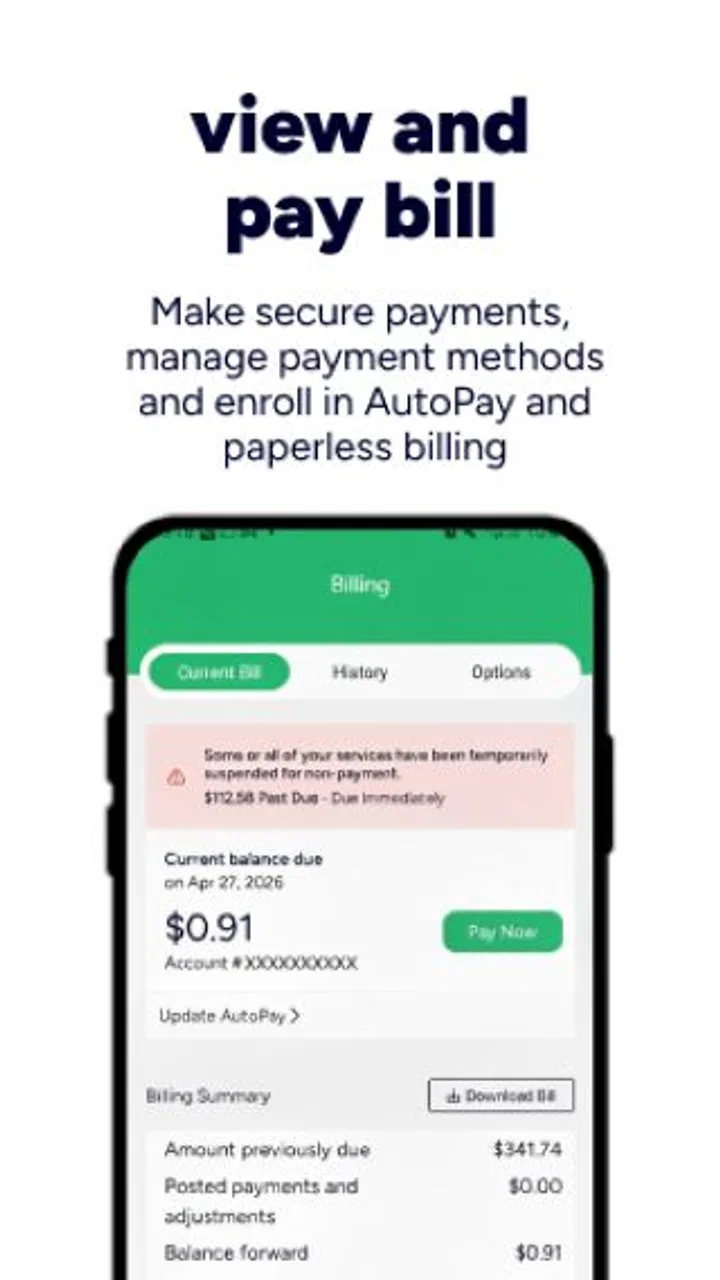
Go Kinetic may allow eligible customers to review service information, manage account settings, check billing details, make payments, view notifications, and request assistance. Available tools can vary according to your plan, region, and account type. After installation, review the account and support sections to confirm which options are enabled for your particular Kinetic service.
04Is Go Kinetic free to download, and are there any extra charges?
The Go Kinetic app is generally free to download from the official Android or iOS app store. However, downloading the app does not make your Kinetic service free, and normal subscription, equipment, installation, or usage charges still apply. Mobile data charges may also apply if you use the app over cellular data instead of Wi-Fi.
05Is Go Kinetic safe to use, and what permissions does it require?
Go Kinetic should be downloaded only from the official Google Play Store or Apple App Store to reduce the risk of installing an imitation application. The app may request permissions related to notifications, network access, or device features needed for account and support functions. Review the privacy policy and permission prompts carefully, and avoid sharing login details outside official Kinetic channels.
Pros
- Simple interface makes tracking and managing kinetic activity easy.
- Useful activity records help users monitor progress over time.
- Supports convenient access to account and service information.
- Notifications can help users stay informed about important updates.
- Works well for users who prefer managing tasks from a mobile device.
Cons
- Some features may depend on an active Go Kinetic service account.
- App usefulness can vary depending on the available local Kinetic services.
- Occasional connection issues may delay updates or account information.
- Users may need to grant permissions for notifications and location features.
- Limited functionality outside the Kinetic ecosystem may reduce its broader appeal.

Go Kinetic
Gallery